
 PonDashi Player Video Dual
A Mac app for instant playout of video, stills and audio on two channels. Run Player 1 and Player 2 side by side, and preview what’s next before you take it to air.
Key features
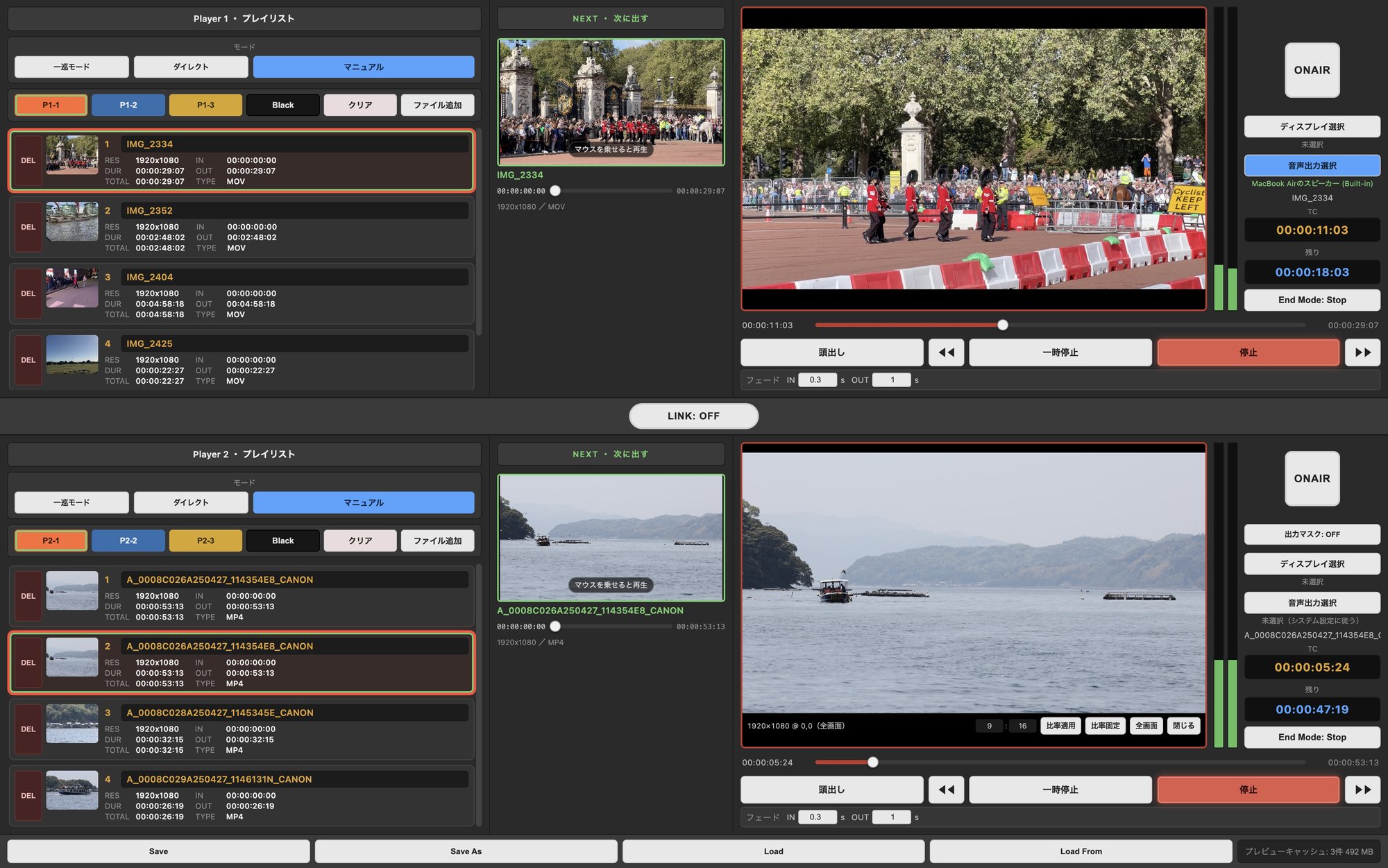
From left: playlist, NEXT and on-air monitor — two identical players, one above the other. (Interface in Japanese.)
- ChooseBefore and during the show
Playlists
Three per player. Drag to add and reorder; “Black” sends black.
NEXT preview
Check the next clip without affecting what’s on air.
- PlayOn air
Three modes
Manual (select, then take), Direct (click to play) and Loop-through (advances automatically).
Fades
IN and OUT from 0 to 5 seconds; video and audio fade together.
- RouteOutputs
Outputs
External displays or SDI output devices, with a separate audio device per player.
Output mask
Crop the picture to suit each venue, such as portrait screens (Player 2).
Supported files
| Video | mp4, mov, mxf, mts, m2ts and more |
|---|---|
| Stills | jpg, png, tiff and more (with a set on-air duration) |
| Audio only | wav, aiff, mp3, m4a and more (audio over black) |
Before you use it
Media is linked, not copied
Video, still and audio files are not copied into the show; the app refers to the original files where they are stored (linked).
- Moving, deleting or renaming the original files makes those cues unplayable (offline). Leave the media folder in place until the show is over.
- Moving to another Mac: copying the show file does not bring the linked media with it. Move the whole media folder and check that every cue plays on the new Mac.
Storage and Mac performance
When loading or transferring audio and video from external drives or over a network, the read/write speed of the storage (SSD/HDD) and the Mac’s performance are usually the biggest bottleneck — more than file size or the connection standard. Video is read from storage continuously during playback. Keep media on the internal SSD or a fast external SSD, and test on the actual show equipment beforehand.